After you read your eID, you can create two A4 PDF documents: a proof of address and an identity report. They’re generated locally, from the data you read, and aren’t saved automatically.
Proof of address
- Read your eID in My eID. See Read your eID on Mac.
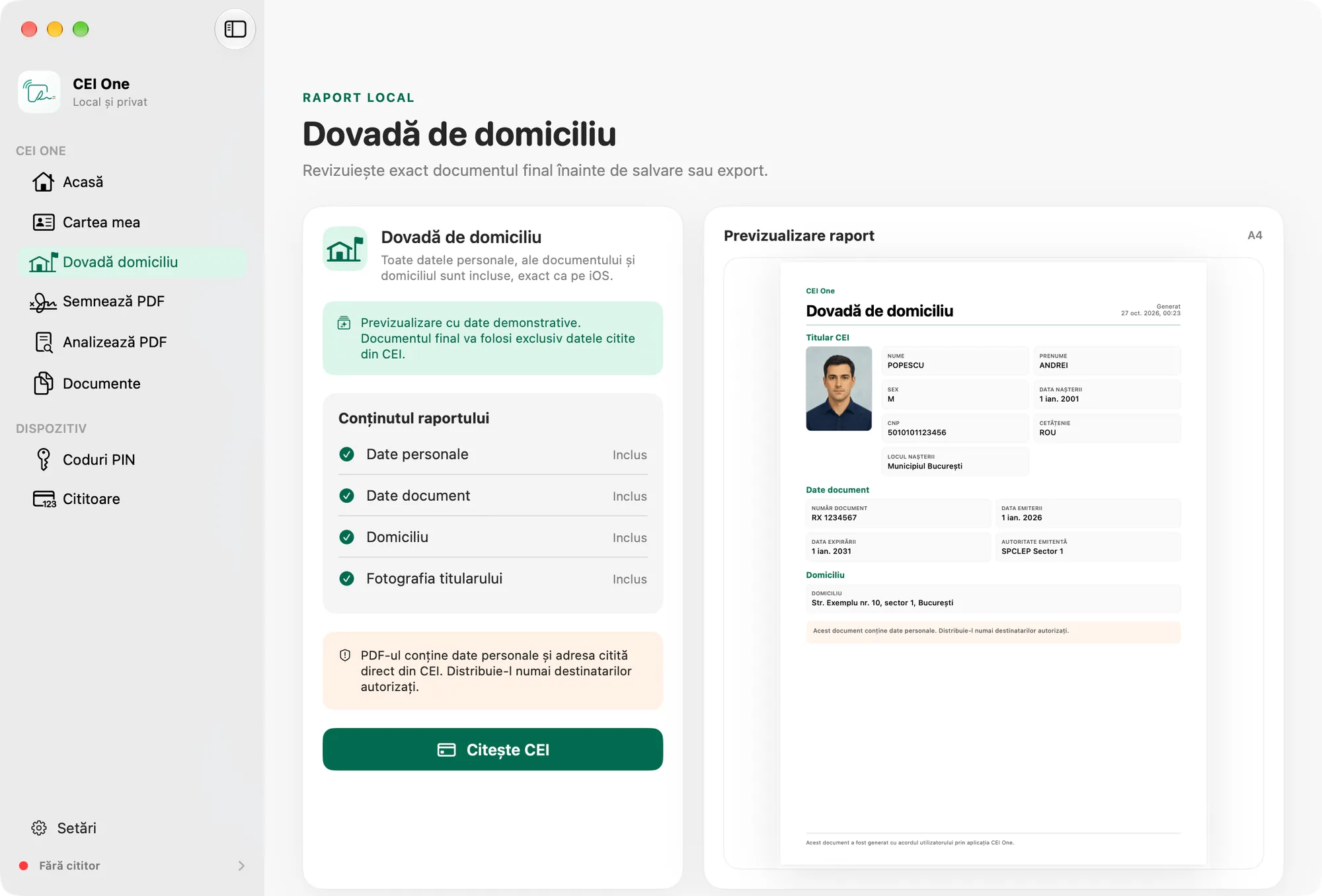
- On the result screen, click Domicile report. Or choose Proof of address in the sidebar (⌘3).
- Check the document in Report preview. The preview shows exactly what the final PDF will look like.
- Click Export PDF… and choose where to save it. Or click Save to library to keep it in Documents.
Under Report content, you can see what goes into the document: personal details, document details, the domicile and the holder’s photo. The proof of address doesn’t include the other data available on the card.
Note
If you open Proof of address before reading the card, the page uses sample data and shows a message saying so. The only action available then is Read eID. The final document uses only the data read from your eID.
Identity report
- After the reading, click Identity report on the result screen in My eID.
- The Identity report sheet opens, with an A4 preview. The report includes all the data that was read, and the photo.
- If you like, turn on Include handwritten signature. This option appears only if the card provided the signature, and it starts off.
- Click Export PDF… or Save to library.
- Click Close (Esc) when you’re done.
What the PDF contains
- The title (“Proof of domicile” or “Identity report”) and the date and time it was generated.
- Sections with the holder’s details (with the photo), the document details and the domicile. The identity report also has the other available data and, if you chose it, the handwritten signature.
- A note saying that the document contains personal data and should be shared only with authorized recipients.
- A line saying that the document was generated with the user’s consent using the CEI One app and, on a report with several pages, “Page X of Y”.
The report makes no claim about the authenticity of the data. It usually fits on one page; if the data is long, it continues on new pages.
The PDF text is in Romanian when the app is in Romanian, and in English otherwise. The suggested file name looks like Proof-of-address-YYYYMMDD-HHMMSS.pdf or Identity-report-YYYYMMDD-HHMMSS.pdf, with the time in UTC.
Important
The PDF needs the holder’s photo. If the photo wasn’t read, Photo not read appears, and Export PDF… and Save to library are turned off. Read your eID again.
Where your documents go
- Export PDF… saves the file wherever you choose, through the macOS save window.
- Save to library keeps it in Documents, on this Mac. See Documents on Mac.
Identity reports and proofs of address aren’t synced with iCloud. They stay on this Mac only.
Important
Both documents contain personal data. Share them only with authorized recipients.