From the data read from your eID you can generate a local PDF: an identity report or a proof of address. The PDF is created on your phone and isn’t saved automatically.
Create a proof of address
The proof of address is a PDF with your personal details, photo and address, read straight from the eID’s chip.
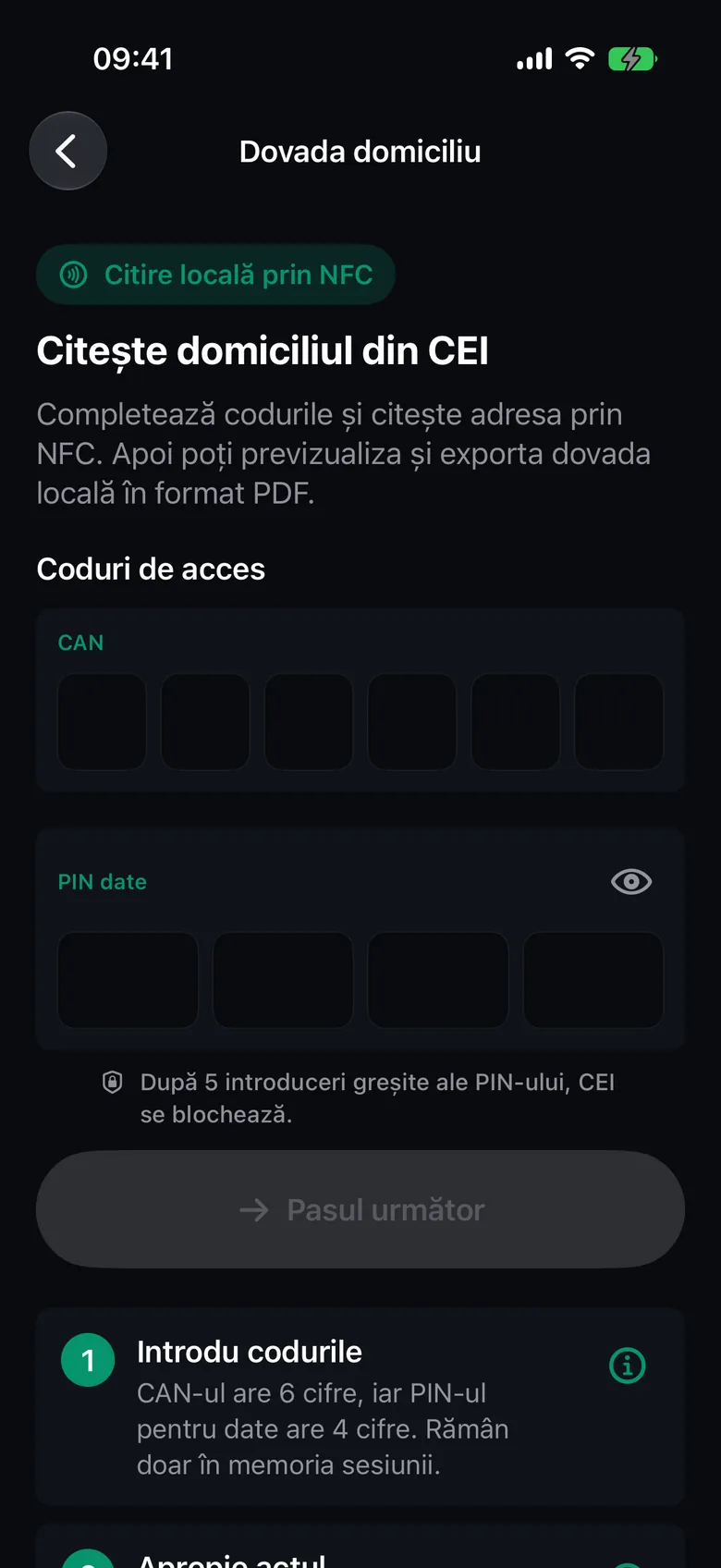
- On the Home screen, tap Proof of address.
- Enter the CAN and your data PIN, then tap Next step.
- Follow the NFC position guide, tap Start reading and hold your eID against the iPhone. The steps are the same as for reading your eID.
- After the read, the Proof of domicile screen opens directly. Check the data shown: all of it will be included in the PDF.
- Tap Preview proof.
- In PDF preview, save or share the document (see below).
Note
If the proof holds a lot of data, the PDF is usually scaled down to one page. If it still doesn’t fit, it continues onto the following pages.
Create an identity report
The identity report includes all the data read from the eID.
- Read your eID from Read your eID. See Read your eID on iPhone.
- On the eID details screen, tap Create PDF report.
- On the Identity report screen, under Report content, you can see which sections go into the PDF and whether the Holder’s photo was read.
- If you also want the handwritten signature read from the eID, turn on Include handwritten signature. The option is off by default and appears only if the eID returned the signature.
- Tap Preview report.
If you see The photo was not read, read your eID again. The PDF can’t be generated without the photo.
Save or share the PDF
In PDF preview there are two icon buttons at the top right:
- Save (Save to local history) keeps the PDF in Local history. Once it’s saved, the icon turns into a checkmark.
- Share (Share PDF report) opens the iPhone’s share sheet: Mail, Messages, AirDrop, Files and more.
Tap Close to go back without saving.
The file gets a name like proof-of-domicile-20261027-101500.pdf or identity-report-20261027-101500.pdf. The time in the name is in UTC.
Important
The PDF contains personal data. Share it only with authorized recipients.
What the PDF contains
- The CEI One header, the title (Identity report or Proof of domicile) and the date it was generated.
- The holder’s details, with the photo.
- The document details and the domicile.
- In the identity report: other data available on the eID and, if you chose it, the holder’s signature.
- A privacy note.
The report doesn’t include any assessment of the data’s authenticity. The text in the PDF can be selected and searched.
Note
Identity reports and proofs of address are never synced to iCloud, even if you’ve turned sync on. They stay on this iPhone only.